# Indicator Grid
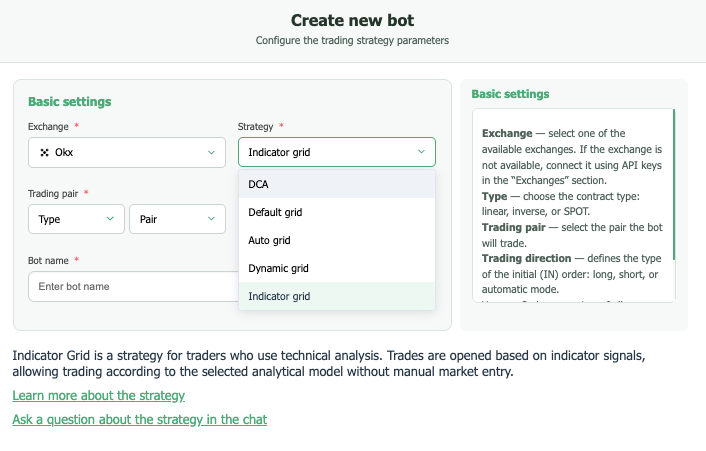
Indicator Grid is a specialized type of bot designed for traders who actively use strategies based on indicators such as EMA, RSI, MA, SMMA, ATR, ATR%, and Supertrend.
***
### Entry Conditions
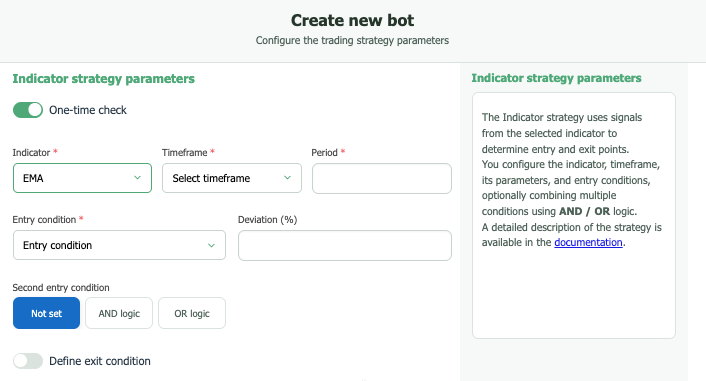
This section allows you to define the criteria under which your bot will automatically open a trading position.
* Indicator — Select the primary indicator whose signals will serve as the basis for trade entries.
* Timeframe — Specify the candle interval on which the selected indicator will be analyzed.
* Combination Logic ("AND", "OR", "None"):
* None — The bot will open a position as soon as the condition based on the selected single indicator is met.
* AND — If you use multiple conditions (e.g., signals from different indicators or multiple settings for one indicator), the bot will open a position only when all conditions are met simultaneously.
* OR — The bot will open a position if at least one of the specified conditions is met.
***
### Exit Conditions
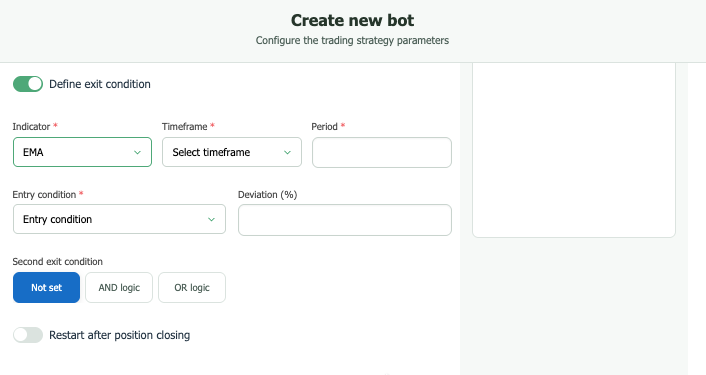
This section allows you to define the criteria under which your bot will automatically close an open trading position.
* If the “Exit Conditions” toggle is disabled, the bot will close trades only based on the settings in the [Profit Settings](https://ginareas-organization.gitbook.io/ginarea.org/eng/bot-settings/profit-settings) section, or when the Take Profit level is reached — whichever occurs first.
* If the “Exit Conditions” toggle is enabled, the bot will close the position based solely on signals from the selected indicator (or a combination of indicators, if additional exit conditions are set), regardless of the current profit or loss of the open position.
***
* Indicator — Select the primary indicator whose signals will determine when to exit a trade.
* Timeframe — Specify the candle interval on which the chosen indicator will be analyzed for exit signals.
* Combination Logic ("AND", "OR", "None"):
* None — The bot will close the position as soon as the condition of the single selected indicator is met.
* AND — If you use multiple exit conditions (e.g., signals from different indicators or multiple rules for one indicator), the bot will close the position only when all conditions are met simultaneously.
* OR — The bot will close the position if at least one of the exit conditions is met.
***