# Account and Exchange Terminal Setup
## Trading on OKX
To start trading on OKX, follow these steps:
1\. Funding your trading account:
* Make sure you have funds available in your OKX trading account.
* To launch a bot, your balance must be at least 200 USDT.
* To run a spot short bot, you need to hold a coin equivalent to 200 USDT in value.
2\. Setting up the OKX terminal:
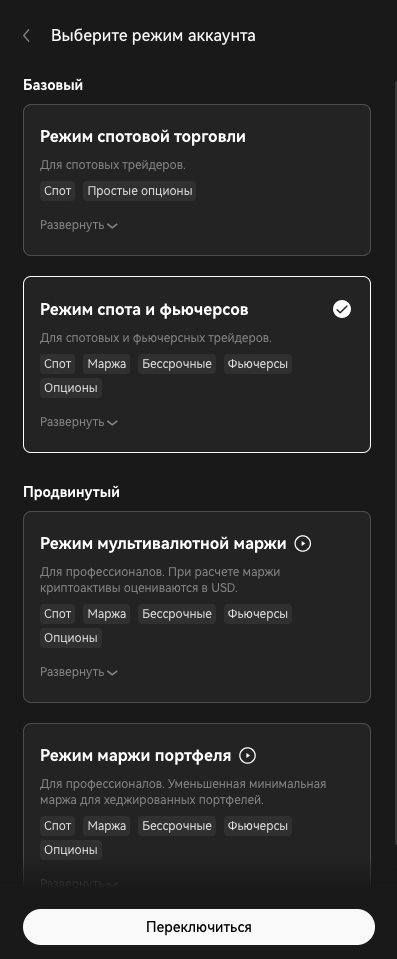
* In the “Margin Mode”, ensure Cross Margin is selected.
* Go to the upper-right corner of the OKX terminal and click the gear icon (Settings).
* In the “Account Mode” section, choose one of the following modes:
* Spot and Futures Mode
* Multi-currency Margin Mode
* Portfolio Margin Mode
* In the “Position Mode” section, select **“One-way Mode”.**
* The Hedge Mode is available only for the [DEFAULT](https://ginareas-organization.gitbook.io/ginarea.org/eng/ginarea-bot-modes-and-types/default) strategy; all other strategies support only One-way Position Mode.
* Leverage:
* Set the maximum leverage, or choose a level that won’t interfere with the bot’s operation and aligns with your personal [risk tolerance when the bot builds a position.](https://ginareas-organization.gitbook.io/ginarea.org/eng/bot-management)
\
[OKX terminal setup](https://www.youtube.com/watch?v=NnfugOx39BU)
***
### Setting up the Bybit terminal:
To trade on Bybit, follow these steps:
1. Funding your account**:**
* To launch spot and futures bots, your balance on the **Unified Trading Account** must be at least **200 USDT**;
* To run a [spot short bot](https://ginareas-organization.gitbook.io/ginarea.org/eng/ginarea-bot-modes-and-types/spot-type), you need to hold a coin equivalent to 200 USDT.
* To use [inverse contract bots](https://ginareas-organization.gitbook.io/ginarea.org/eng/ginarea-bot-modes-and-types/coin-futures-type), you must also hold a coin equivalent to 200 USDT
2. **Setting up the Bybit terminal:**
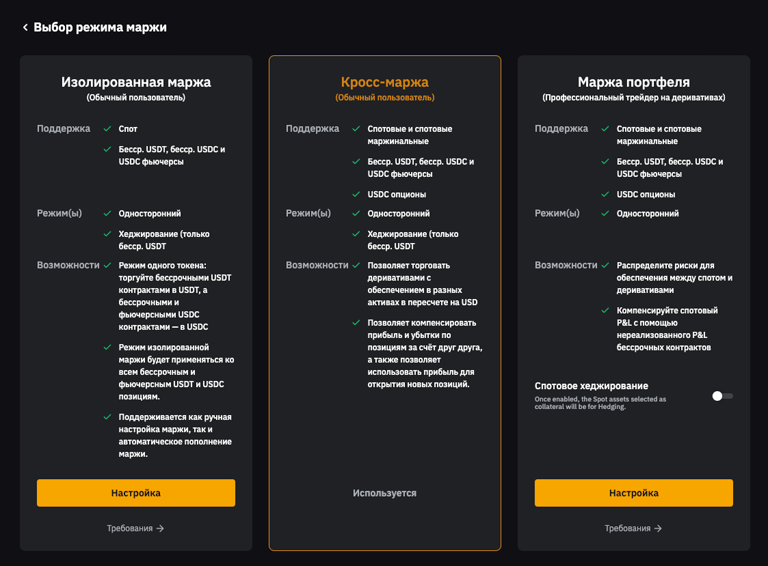
* In the **“Margin Mode”** section, select one of the following:
* **Cross Margin**
* **Portfolio Margin**
* In the **“Position Mode”** section, select **“One-way Mode”**.
* The Hedge Mode is available only for the [DEFAULT](https://ginareas-organization.gitbook.io/ginarea.org/eng/ginarea-bot-modes-and-types/default) strategy; all other strategies support only One-way Position Mode.
* **Leverage:**
* Set the maximum leverage, or choose a level that does not interfere with the bot’s operation and matches your personal risk tolerance when the bot opens positions.
**Using Coins as Collateral:**
If your selected account mode allows it, you can use coins as collateral for trading on both OKX and Bybit.